Converters
Converters take an existing value and replace it with something that looks realistic, but isn't real.
About the converters
All converters follow a few basic rules:
- Null values are skipped.
- If possible, the converter runs as a single SQL statement (for performance).
The sections below walk through each converter. You can use the Converter form to follow along.
Converter: ColumnName_ID
Top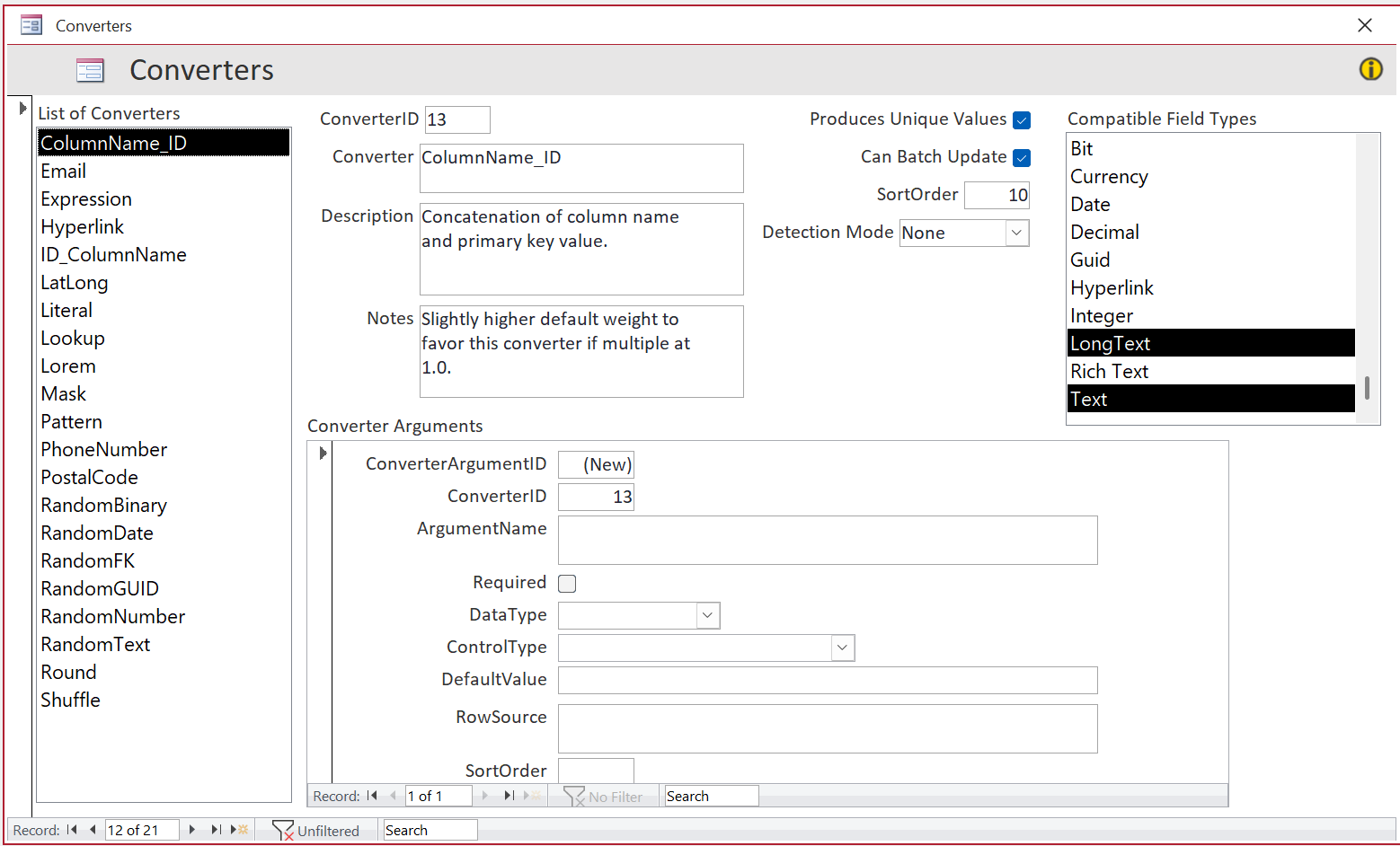 Figure 1 — ColumnName_ID converter.
This converter replaces the value with the column name followed by the primary key value.
It produces unique values, so it works with unique indexes. It can also run as a single SQL statement instead of one row at a time.
It only applies to Text and LongText columns, since the result is alphanumeric.
This converter has no arguments. It is the default for a text column when nothing more specific applies: in the Auto-Assign process it alone receives a small prior in the Universal tier, which makes it the winner among converters that fit any text column. The prior is deliberately tiny — smaller than the boost that accumulated history can contribute — so that if you have repeatedly chosen ID_ColumnName for a column in earlier databases, your history wins and Anonymize follows your preference.
Some fields on the Converter form such as DetectionMode are used by Auto-Assign. See the Auto-Assign page for details.
Converter: Email
TopThis converter replaces the value with "test", the primary key value, and "@test.com".
It produces unique values and can run as a single SQL statement, so it works well with unique indexes.
Converter: Expression
TopThis converter takes two arguments:
-
Expression:
If Apply as a single batch is checked, this must be a valid SET expression for the
target database.
If not checked, it must be a VBA expression that can be evaluated using
Eval. - Apply as a single batch: If checked, the converter runs a single SQL statement. If unchecked, it runs row by row (RBAR), allowing the use of VBA functions.
Examples:
| Access | SQL Server | Notes |
|---|---|---|
| UCase([FirstName]) | UPPER([FirstName]) | Built-in functions |
| [Salary] * 0.9 | [Salary] * 0.9 | Scalar arithmetic |
| DATEADD('d', 7, [OrderDate]) | DATEADD(d, 7, [OrderDate]) | The expression can reference another already anonymized column in the same row (columns are processed in column_id order). |
| '***-**-' + RIGHT([SSN], 4) | '***-**-' + RIGHT([SSN], 4) | Partial masking. |
Note on randomness: functions like Rnd (Access) and RAND (T-SQL) are evaluated once per batch. To get different values per row, pass the primary key into a VBA function (see RandomGUID), or use a construct based on NEWID() in T-SQL like DATEADD(d, ROUND(6 * RAND(CHECKSUM(NEWID())) + 1, 0), [OrderDate]).
Converter: Hyperlink
TopThis converter is for Access columns with the Hyperlink data type, and SQL Server columns with text (e.g. nvarchar(max)) with a hyperlink pattern as defined in Detection Patterns form.
Converter: ID_ColumnName
TopThis converter works the same way as its cousin ColumnName_ID, with the column name and the primary key value in the opposite order.
Converter: LatLong
TopThis converter offsets the original latitude/longitude by about 10–30 km, so the new location stays in the same general area. In some cases, the result may fall in water.
Other options include providing lat/long in a lookup table. tblAnonLookup_US_City_State_Weight has the beginnings of that, and then the multi-column Lookup converter can be used to apply that location.
Converter: Literal
TopUse this converter to set all values in a column to a fixed value (for example, 0 or "test"). The special value {Null} represents a database NULL.
Converter: Lookup
TopThe Lookup converter replaces values with realistic-looking alternatives. When using the RandomText converter on a FirstName column, the name might become zlpPqBvN. If Anonymize uses the Lookup converter, it might pick MICHAEL from tblAnonLookup_FirstName_Gender_Weight, which is much easier to read and work with.
You can provide your own lookup tables, and/or expand and modify the existing ones. Lookup table names do not have to follow the tblAnonLookup* naming convention, but they must be entered in the Lookup Tables form. They can be country-specific, or generic. If they have "Weight" column, we will do weighted lookups.
If the lookup table has a Weight column, it will be used to provide "Weighted Lookups", meaning that a random pick from the list skews to the higher weights. As an example, the FirstName of MICHAEL is #4 in the list, and will be selected randomly more frequently than AHMED at #1000. Note that the 'Weight' column of a lookup table should not be entered in the Lookup Tables form.
A lookup can be over several columns. If we Anonymized City and State separately, we might end up with Los Angeles in Arizona, which creates unnecessary friction. Lookup Converter can handle multi-column scenarios, so City and State are randomly selected together.
A database table can use several lookup tables. This is why the last argument of the Lookup converter asks if this is a continuation of the same lookup as before (e.g. we already set City to use Lookup, and now State is going to use the same lookup table), or a new lookup (e.g. we already set City and State, and now want to do a FirstName lookup from a different table).
Converter: Lorem Ipsum
TopThis converter replaces text (typically long fields like Notes) with Lorem ipsum. It can preserve the original length or vary it slightly, within the column limit. For longer text (> 445 chars), the Lorem ipsum content repeats as needed.
If the text field is < 445 chars, and Randomize Percent is 0 (the default), then this converter uses the fast Batch process, otherwise RBAR.
Lorem will also be used for HTML, Rich Text, XML, and JSON content. Such a column always takes the RBAR path, whatever its length: the Batch process trims the text to fit with a simple truncation, which would slice through the markup and leave tags unclosed.
Converter: Mask
TopThe Mask converter is partially a convenience: the Expression converter can do much of the same, but requires more knowledge of the correct syntax. This converter adds Random mask, which is not easily possible with Expression converter, and supports both back-ends. Also, Pattern converter generates a new value that matches a shape; Mask preserves a portion of the original value.
To mask an SSN, the user would select Right, 4, *, and an SSN of 123-45-6789 would be converted to ***-**-6789.
The Mask converter is not auto-assigned, because it requires too much semantic information, but it is available for manual selection.
Converter: Pattern
TopThis converter is for columns where the format of the value matters, but the actual value can be random. Using the special characters defined for the Access InputMask, you can define the pattern and Anonymize will generate random instances of it.
Example: the pattern >00-LLLL may generate: 98-GARH, 91-NNAN, and 72-XLTK.
The auto-assign process can detect patterns, including multiple patterns, such as Northwind Dev Edition ProductCode, which can have 1 or 2 trailing numbers.
During the Apply process, the Pattern converter will emit unique values if the column has a unique index. If there is no such index, the pattern will be random, but weighted for the prevalence of each letter for the current Country.
Converter: PhoneNumber
TopThe PhoneNumber converter looks at the currently selected Country (in frmAnon) and selects the pattern(s) and their weight(s) for that country, and uses it to generate random phone numbers.
Converter: PostalCode
TopThe PostalCode converter looks at the currently selected Country (in frmAnon) and selects the pattern(s) and their weight(s) for that country, and uses it to generate random postal codes / zipcodes.
Converter: Random Binary
TopThis converter replaces binary information with random selections from a lookup table. This applies equally to images or files or blobs that may be stored in a database table.
The lookup tables can be local tables, or linked tables. They have to be specified in the Lookup Tables form. For Access Attachment columns, the lookup table should also use Attachment data type, and for OLE Objects, that data type as well. For SQL Server tables varbinary(max) or the older image data type can be used.
The Auto-Assign process will assign this converter to a binary column, provided you have registered a lookup table whose binary column is of a compatible type — that pool is where the replacement content comes from, so without one there is nothing to draw from and the column is left for you to review.
Converter: Random Date
TopThe RandomDate converter generates a date between a low and high value. Expressions such as the use of DateAdd or DLookup are supported.
 Figure 2 — After setting arguments for RandomDate converter.
Converter: Random FK
TopThis converter is for foreign key columns. It assigns a random value from the referenced table's primary key. For example, after running this on tblOrders.CustomerID, orders are reassigned to random customers, while the customer records themselves remain unchanged.
There is one argument: Weighted lookup. It is not checked by default, and not checked by the Auto-Assign process. When checked, the FK values follow the same distribution as current; when unchecked, the FK values are randomly selected. Weighted lookup may be appropriate in some cases, e.g. where the beta test team gets orders with the same OrderStatusID distribution as in the Production database, so the data looks more realistic and the app behaves more like in the real world.
There are a few limitations with this converter, mostly related to the presence of a unique index on the FK column. Since Random and Unique don't mix, those columns will not be auto-assigned this converter, nor will you be able to assign it manually.
Converter: Random GUID
TopThis converter generates a new GUID for each row. For SQL Server it runs as a single statement; for Access it calls a VBA function to get a new GUID.
Converter: Random Number
TopThis converter can be used for all numeric columns, as well as Currency. LowValue and HighValue can be set to Decimals for Single and Double data types.
In the Auto-Assign process, the converter arguments are assigned based on the Min and Max values detected in the Scan, but modified outwards to the nearest half-order of magnitude, e.g. 1, 5, 10, 50, 100, 500. This is to prevent leakage of sensitive information, while maintaining a realistic distribution of values.
If a column uses a sentinel value (e.g. 999999999 to indicate "not applicable"), the Auto-Assign process will use that value, and the Min/Max range will be very large. We recommend against such sentinel values, but if they are used, the user should manually set the LowValue and HighValue to a more reasonable range.
Bit should not be used; Shuffle is a better choice for that. Anonymize only uses it as a fallback position if Shuffle is not available.
Converter: Random Text
TopThis converter is similar to a 1-column Lookup converter, but the lookup values are inline, specified in the converter argument. Example: aaa;bbb;ccc
If no argument is given, a random string is used of the same length as the original string.
Converter: Round
TopThis converter works on numeric and currency data types, and rounds the values to the specified precision. There are 3 sub-types:
- Significant figures: A value of with precision 2 is rounded to .
- Decimal places: A value of with precision 2 is rounded to .
- Nearest N: A value of with precision 1000 is rounded to .
This converter is not auto-assigned; it requires too much semantic information to be able to auto-assign the arguments. It is available for manual selection only.
Converter: Shuffle
TopThis converter rearranges existing values between rows instead of generating new ones. This is not suitable for sensitive data, but can help when random values would break the application.
The Shuffle converter is not suitable for columns that have all three of these: required field, unique index, and a foreign key relationship.
Shuffle will only be auto-assigned to Bit columns, in order to prevent leakage of sensitive information. It is available for manual selection for other data types.